Horizontal Text alignment
POST
With the horizontal text alignment,
it is possible to achieve an automatic horizontal alignment of text lines.
"HorizontalAlignment"
·
0 → align left
·
1 → align center
·
2 → align right
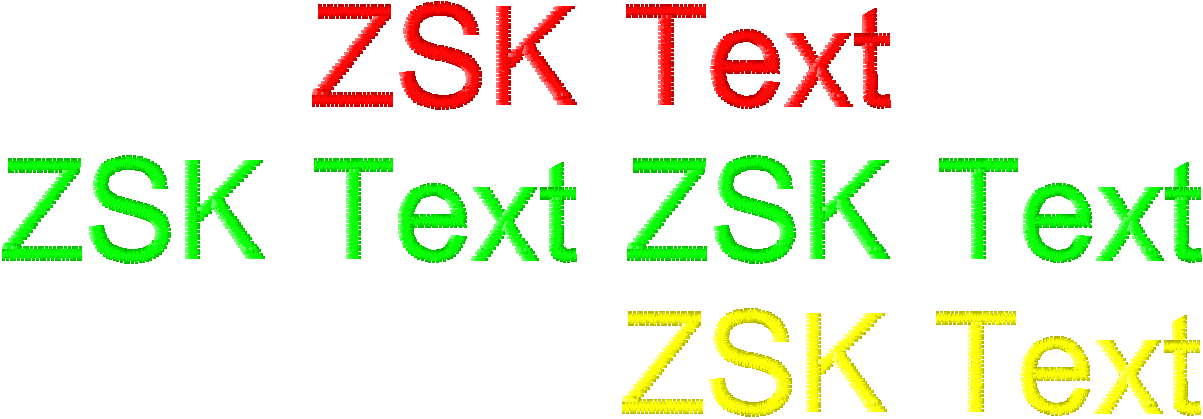
The reference line is the green line
in the middle, as it is the longest of the three lines.
The red line has center aligned and
the yellow text is aligned.
Example
{
  "RequestType": "CreatePNG",
  "Monograms": [
    {
      "Text": [
        "ZSK Text"
      ],
      "FontFamily": "Arial",
      "FontSizeMM": 10.0,
      "UsedNeedle": 1,
      "HorizontalAlignment": 1,
      "TextBendProcent": 0.0,
      "TextStitchParameter": "Premium"
    },
    {
      "Text": [
        "ZSK Text ZSK Text"
      ],
      "FontFamily": "Arial",
      "FontSizeMM": 10.0,
      "UsedNeedle": 2,
      "HorizontalAlignment": 0,
      "TextBendProcent": 0.0,
      "TextStitchParameter": "Premium"
    },
    {
      "Text": [
        "ZSK Text"
      ],
      "FontFamily": "Arial",
      "FontSizeMM": 10.0,
      "UsedNeedle": 6,
      "HorizontalAlignment": 2,
      "TextBendProcent": 0.0,
      "TextStitchParameter": "Premium"
    }
  ],
  "Needle": [
    {
      "Red": 255,
      "Green": 0,
      "Blue": 0,
      "Name": "Red"
    },
    {
      "Red": 0,
      "Green": 255,
      "Blue": 0,
      "Name": "Green"
    },
    {
      "Red": 0,
      "Green": 0,
      "Blue": 255,
      "Name": "Blue"
    },
    {
      "Red": 0,
      "Green": 255,
      "Blue": 255,
      "Name": "Cyan"
    },
    {
      "Red": 255,
      "Green": 0,
      "Blue": 255,
      "Name": "Magenta"
    },
    {
      "Red": 255,
      "Green": 255,
      "Blue": 0,
      "Name": "Yellow"
    }
  ],
	"PngResolution": 254,
	"ServerVersion": 3,
	"WebApiLicense": "xxxxx-xxxxx-xxxxx-xxxxx-xxxxx"
}